
- In this edition: Two Things Every Gmail User Should Do Right Now.
- How Many Email Addresses Do You Really Need?
- It Looks Like a Message from the Boss, but it’s the Most Expensive Scam in Cybercrime.
Step 1: Change Your Password Now
This year, a massive data leak has exposed more than 183 million email and password pairs, including millions of Gmail accounts, primarily due to reused passwords stolen in older breaches.
Google is urging all users to change their Gmail password, especially if the password was reused elsewhere, to stay secure.
To update your password, open Gmail, click your profile icon, choose “Manage your Google Account” > “Security” > “Signing in to Google” > “Password” to create a strong, new password.
A strong Gmail password should be at least 12 characters and contain a mix of uppercase and lowercase letters, numbers, and symbols.
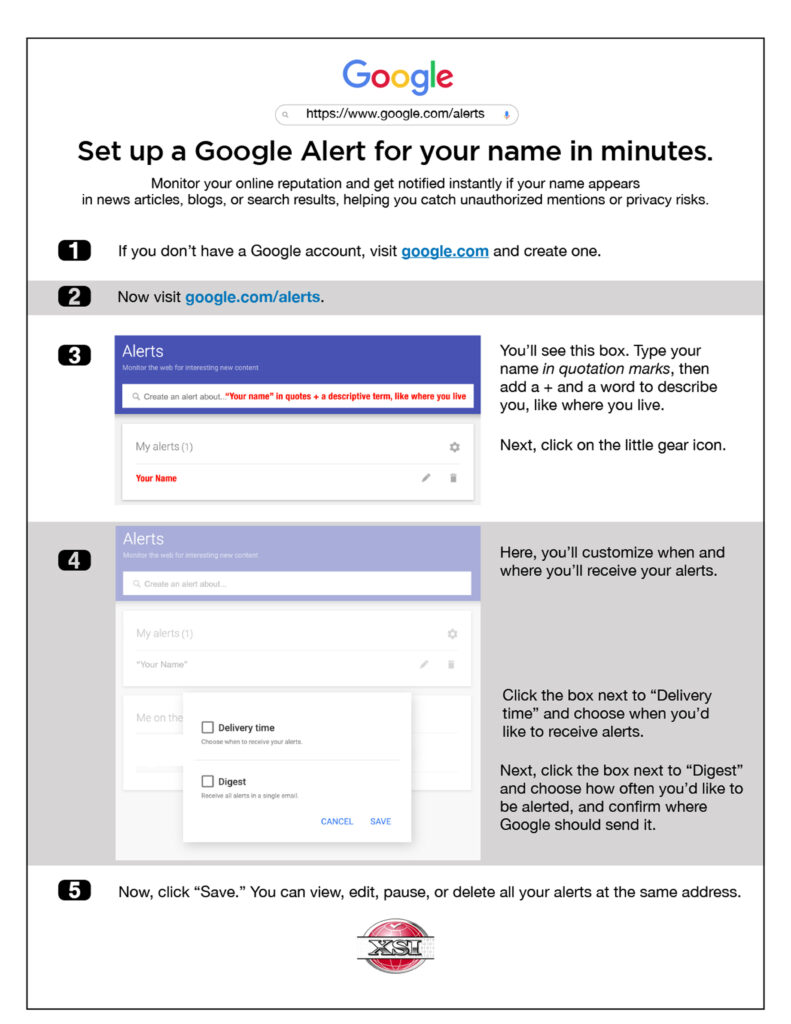
Step 2: See What the Internet Says About You
Cybersecurity News You Can Use
If you get a call or text from your bank (or any bank) about a “fraud case,” hang up.
The New York Times says it is one of the most common scams right now. Criminals make the number that shows up on caller ID say the name of the bank.
Once a victim is on the line, they make up case IDs and claims to be a bank supervisor. They guide the victim through steps aimed at “protecting” the money in their account by wiring to a safe account using the popular Zelle money transfer platform. But the account they send it to is theirs.
AI matchmaking is coming to dating apps: Tinder is rolling out a new optional feature called “Chemistry” that will scan the photos on the user’s phone and ask questions to figure out their interests.
Getting started early: 38% of two-year-olds in the U.S. play with smartphones. Pew Research says 57% of 12-year-olds now have their own phone.
Yes, the password used to protect priceless jewels from theft at the Louvre Museum in Paris was “Louvre.” The jewels still haven’t been recovered. And it gets worse: the two most common passwords in use right now are still “123456” and “admin.” Hackers can bypass those in less than one second.

One more thing...

Ask Us About Cyber
How many email addresses are too many? I’ve got my main work email, another one for a side job, and one just for friends and family — plus my original Yahoo address from way back in 2000. I’d love to shut down the Yahoo account, but every once in a while, something important still lands there (along with tons of spam). What’s a reasonable number of emails to keep?
The security company Surfshark suggests a reasonable number of email addresses for most people is about three: one for personal use, one for work, and one for shopping and subscriptions. This setup helps manage organization and security, but if you find old accounts like Yahoo or AOL still receive important messages, consider keeping them until you’ve migrated anything essential.

Has anyone found a good way to remove personal information from those sites like TruthFinder, Instant Checkmate, or Cyber Background Checks? They all want you to confirm your phone number or email to “opt out,” but that just feels risky — and the info keeps popping back up anyway. Is there any way to stop these sites for good?
Once something is out there on the web, it’s usually out there permanently. Unfortunately, there’s no guaranteed way to stop sites like TruthFinder or Instant Checkmate from ever reposting your personal information, since these companies continuously scrape public records and add new entries. You can manually opt out using their online forms or use a data removal service that sends repeated takedown requests and monitors for your info, but your details may resurface over time.
I use Xfinity internet and a Comcast email account, and lately I’ve been getting messages saying I need to “update my account” or it’ll be shut down. I’ve been marking them as junk, but they keep coming. It seems like a scam — is it?
Emails claiming your Xfinity or Comcast account will be shut down unless you “update” your information are almost certainly fake. Scammers use urgent language and fake account links to trick you into giving up your login credentials or personal details. Keep marking them as junk, never click any links, and log in to your Xfinity account directly through the official Xfinity website to see if there’s an issue.
Cyber cartoon © 2025 CartoonStock | Original content © 2025 Aware Force LLC