

October is Cybersecurity Awareness Month (CSAM), which is an international initiative that aims to educate everyone about online safety and empower both individuals and organizations to protect their data from cybercrime.
This year, we have a full interactive event lineup to deepen your security knowledge. From a conversation on “Women Navigating Risks in AI and Technology,” a discussion covering “Tips for Raising Cyber Smart Children,” to a Cyber Escape Room in London, there will be something for everyone.
Take a look here for the full calendar of events.
We are thrilled to announce the launch of our brand-new Technology Risk Team FX site! This dedicated platform is your go-to source for the latest technology risk topics, upcoming events, past newsletters, and a wealth of other relevant resources.


Tell us about yourself: I joined in March 2022 as part of the Application Security Team. My background is in Cybersecurity, and I previously worked as an Application Security Engineer for three years. I earned my master’s degree in Cybersecurity from Stevens Institute in NJ. Additionally, I hold two certifications: GXPEN (Security Exploit Researcher and Penetration Tester) and GCPN (Cloud Penetration Tester).
Tell us about your role: In my role leading the team of Application Security engineers, I help our Technology teams keep our software applications safe and secure. This involves finding potential security issues and working with development teams to fix them. I also give advice on writing secure code and help design security features. Additionally, I use tools to monitor our applications for threats and collaborate with other departments to implement our security policies.
Biggest challenge(s) you face in your role: One of the biggest challenges I face is keeping up with the constantly evolving landscape of security threats. It requires continuous learning and adapting to new vulnerabilities and attack methods. Another challenge is effectively communicating complex security issues to non-technical team members and ensuring that security measures are implemented correctly across different teams. Balancing these responsibilities while also managing day-to-day tasks can be quite demanding.
Favorite thing about working in security: I like puzzles a lot, and every problem I encounter, I think of it like a puzzle to solve. I enjoy the problem-solving aspect of my job the most. It’s rewarding to find and fix security issues before they become problems. I also appreciate working with different teams and helping them understand how to improve the security of our applications. The dynamic nature of security keeps things interesting and constantly pushes me to learn and adapt.
Pay... or No?
An email warns: pay this bill immediately…or else.
Should you trust it?
Watch this video and you’ll see.
Today, our mobile phones are practically glued to our fingertips, serving as indispensable tools for communication, navigation, and information access. However, the same devices we rely so heavily on simultaneously compromise our personal privacy by sharing information about who we are and where we are. To prevent identity theft and other forms of criminal activity, it’s crucial to understand how mobile phones collect data on you and how you can safeguard your information.
Key Areas of Concern:
- Communications: Mobile phones log all calls, texts, and emails. Even if you delete them from your device, telecom companies retain records of your activity.
- Tracking: To connect to cell towers, your phone uses GPS functionality, creating a record of your movements and locations. While convenient for navigation, this also means your whereabouts are continuously tracked.
- Web Interactions: Browsers and mobile applications collect data on your interests, purchases, and browsing habits, creating a detailed digital footprint.
- Mobile Applications: Many applications access other tools on your device, such as your email, microphone, and camera. This means more information about you could be accessible than you intended.
Steps to Lock Down Your Device:
- Download applications only from legitimate stores (Apple App Store and Google Play) and delete those unused.
- Understand the location information shared with the applications on your phone. Adjust as you see fit:
- For iPhone, go to Settings > Privacy & Security > Location Services
- For Android, go to Settings > Location > Google Location Settings
- Best practice is to grant applications as few permissions as possible (i.e. only those which are necessary for the application to work)
- Ex. A ride sharing application would need access to your location to pick you up (but only while using the application)
- Always stay up to date with the latest software updates (which typically include security patches/fixes)
- Use private browser or “Incognito Mode” when browsing on your phone
By understanding the ways in which your mobile phone can share your information and taking steps to control access, you can better protect yourself from potential privacy breaches.

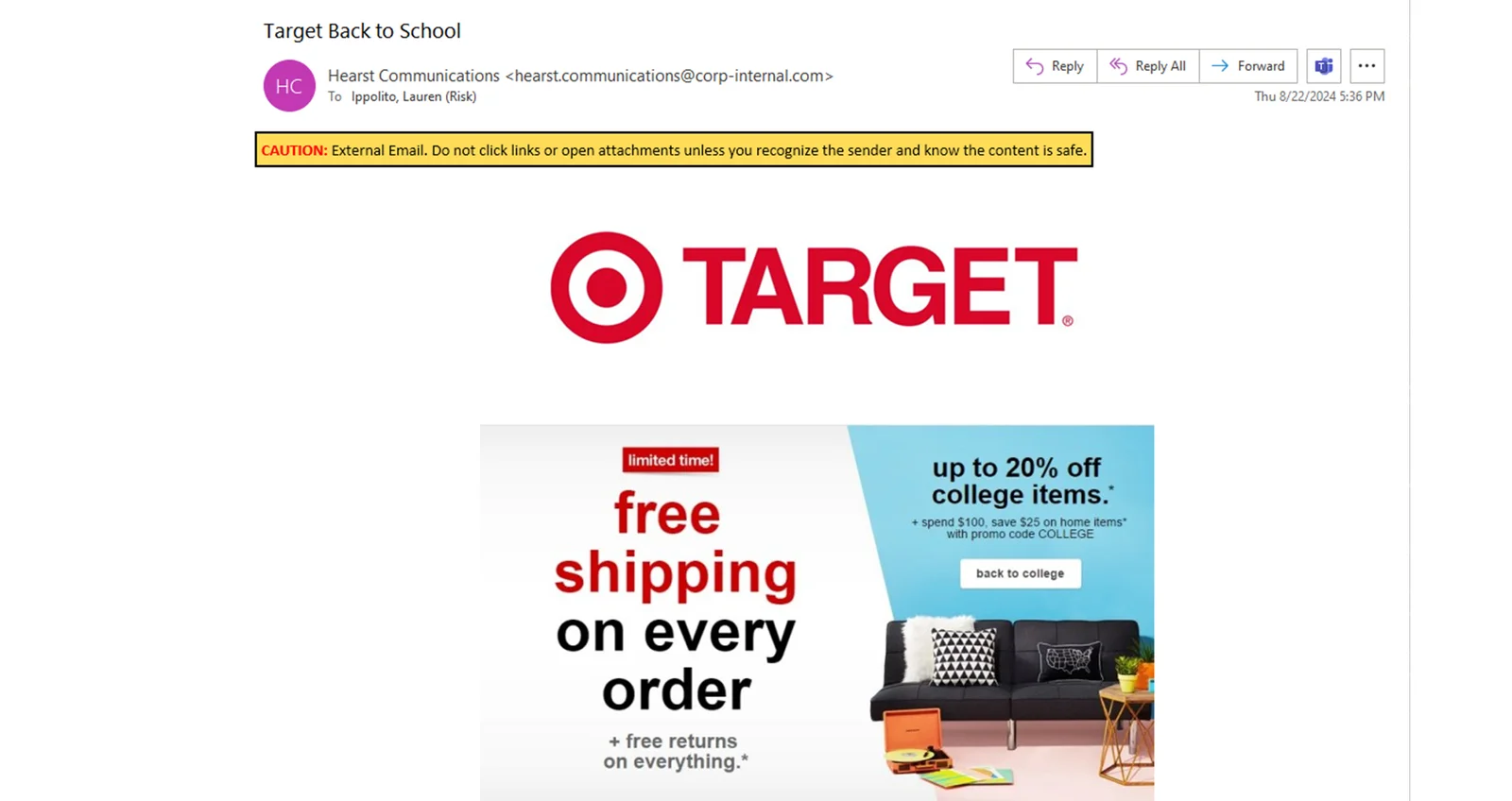
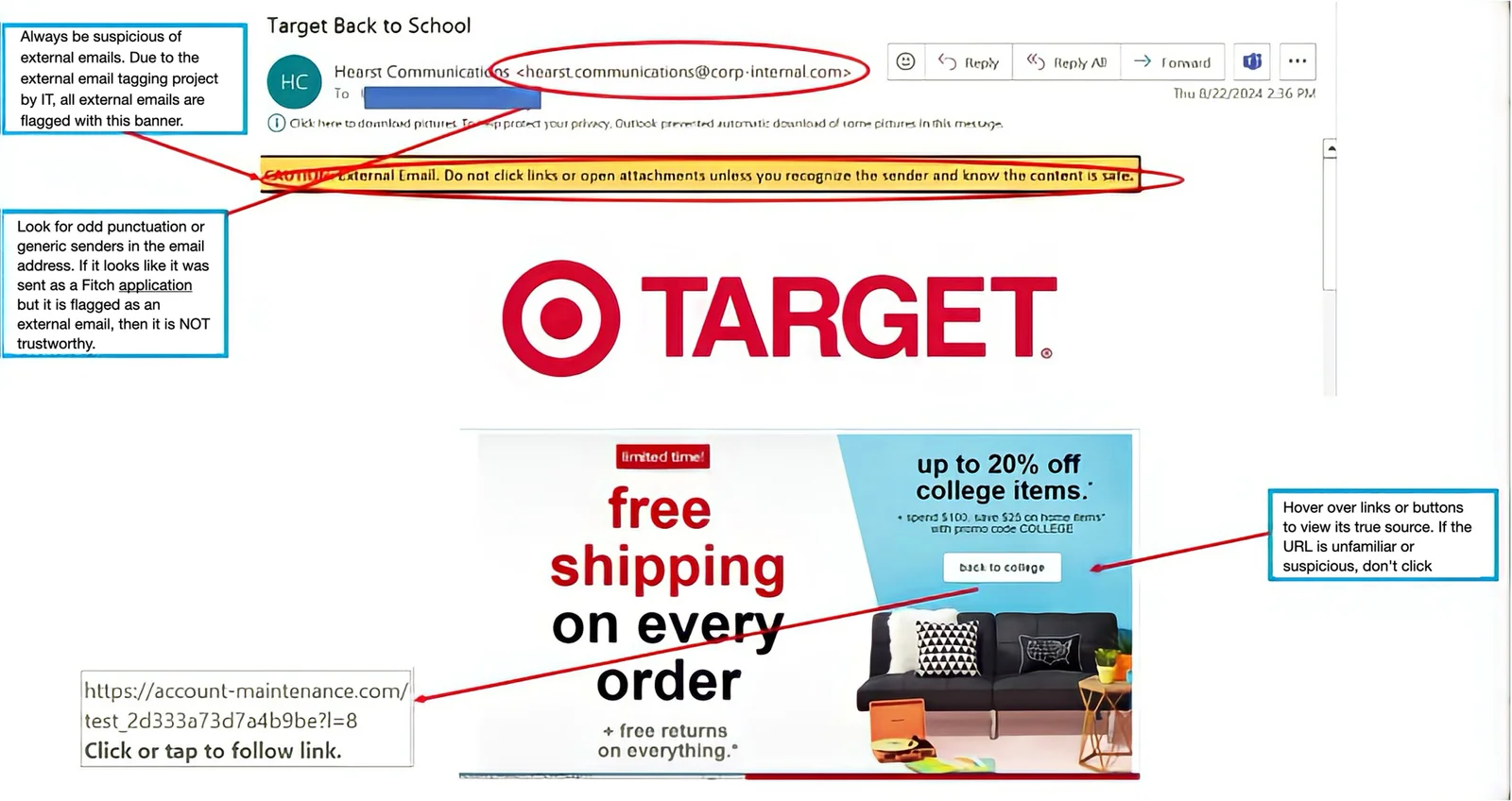
Were you part of the August “Target Back to School” phishing campaign? Whether you were included or not, let’s review the Fitch simulated phishing campaign and breakdown what is phishy about this email.
Drag the slider bar below from right to left to spot clues this is a phishing email.

Guess the 5-letter cybersecurity word.
You have 5 tries.
Correct letter, correct spot.
Correct letter, incorrect spot.
Wrong letter.
Hint: A deceptive attempt to obtain sensitive information by disguising as a trustworthy entity.
Score: 0
Phish of the Week
Check out this “vish,” a voicemail from a scammer.
In this example, they’re offering to cancel your income tax bill as part of some government relief program.
(Hint: it’s too good to be true.)
Scammers require an upfront payment, which they keep without delivering anything to the victim.
Click the arrow below to listen.
Cybersecurity News You Can Use

POPULAR FLIGHT APP HACKED: Check your phone for an app called “FlightAware.” The Cybersecurity Hub says hackers have been stealing users’ information from the real-time flight app because it lacked proper password safeguards. If you use FlightAware, change your password immediately. If the app is on your phone and you don’t use it, log in to your FlightAware account, cancel it, and then delete the app.
MAC USERS, JUST SO YOU KNOW: Apple frequently ran commercials for its Safari web browser during the recent Paris Olympic Games, claiming that Safari offers greater privacy than other browsers. Yes, but…the Washington Post says users should understand that even if they turn on “private browsing” mode, their information is still visible to websites they visit, their internet service provider, and their employer (if using a work computer). The Post says the Firefox browser is best at protecting users’ privacy.
These organizations say they have been hacked recently. If you do business with any of these companies, change the password on your account and use two-factor authentication wherever possible.

Want to know more?
Visit us at the Technology Risk Team FX site for helpful resources
or contact us at information.securitygroup@
to share interesting articles or suggestions for future newsletter topics.
Answers to Your
Cybersecurity Questions
“What’s the best practice for allowing or blocking cookies and permissions? For instance, there are several permissions on Instagram. Should all of them be deleted?”
— Ashley M.
When most people see a pop-up box asking how you want the website to handle “permissions,” they click “accept all.” But you should only grant access to permissions the app requires to function correctly. For example, flashlights and calculators sometimes request access to your location, microphone, camera, or list of contacts. They might like to have access to that information, but they don’t need it.
“Is two-factor verification necessary?”
— Jennifer H.
Admittedly, using two-factor authentication is a bit of a hassle, but it’s wise to use it with any account that offers it. That way, even if scammers manage to steal your password, they’d still need access to that one-time code to get into your account. Here’s a tip: it’s a bit safer to have that one-time code sent via email instead of as a text message.
“I received a letter from “Change Healthcare,” saying they had been hacked. They’re offering to place a fraud alert on my credit file and a security freeze with consumer reporting agencies. Is it real? Please advise.”
— Richard E.
Yes, this alert is legitimate. Change Healthcare is a big company that handles medical billing for hospitals, doctors’ offices, and pharmacies. It suffered a data breach earlier this year that exposed personal information, including health and payment information about potentially millions of people in the U.S. It’s better to set up fraud alerts and freeze your credit yourself than use a breached company to do it. If you decide to proceed, save all the paperwork and communications.
Original content © 2024 Aware Force LLC