
August 2025 | 10 minute read
The Information Security Team is excited to provide its monthly newsletter,
keeping the Fitch community informed and engaged in cybersecurity.
As part of Cybersecurity Awareness Month,
we are excited to present a unique event featuring Paul Draper,
a world-renowned Las Vegas-based mentalist, magician, and anthropologist!
11:00 am Eastern | October 15th
About Paul Draper
Paul Draper has amazed audiences on the History Channel, Discovery Channel, HBO, and more. He is famous for his mind-reading, magic, and insights into human behavior, making his performances both entertaining and thought-provoking.
Why Paul Draper?
Cybersecurity isn’t just about technology; it’s also about people. Cybercriminals use tricks like social engineering, phishing, and scams to manipulate our thoughts and actions, often by “reading” human behavior. Paul’s show will highlight just how easily our minds can be influenced, and why staying alert is your best defense!
What to Expect
Join us for an interactive virtual performance featuring mind-bending demonstrations and psychological illusions, all with a special focus on the tricks that cybercriminals use to fool us. You’ll learn how to spot suspicious behavior, protect yourself from scams, and understand the human side of cybersecurity, all while being thoroughly entertained.
Want to Volunteer?
Would you like to be part of the show? We’re looking for volunteers to participate in Paul Draper’s interactive performance! Great! You have until September 19th to email the infosec awareness address that you’d like to participate. Just send your name to [email protected].
This is a fun and memorable way to boost your cybersecurity awareness. Don’t miss out!
Did You Notice Last Month's Phishing Attempt?
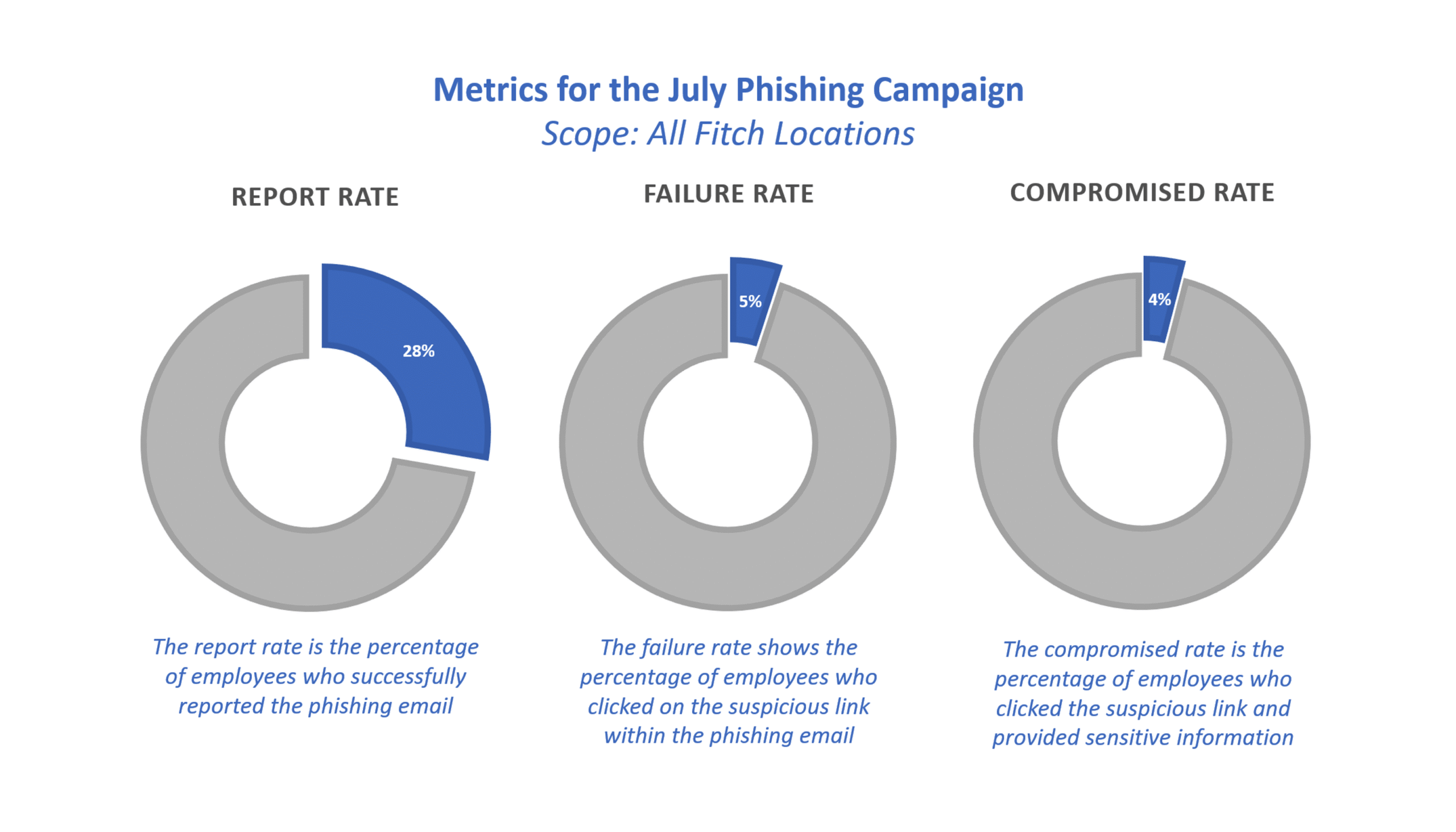
In July, all employees were targeted by a phishing campaign disguised as a password update.
Our goal with this simulation is to highlight how phishing attempts can look like various emails beyond standard marketing or communications messages.
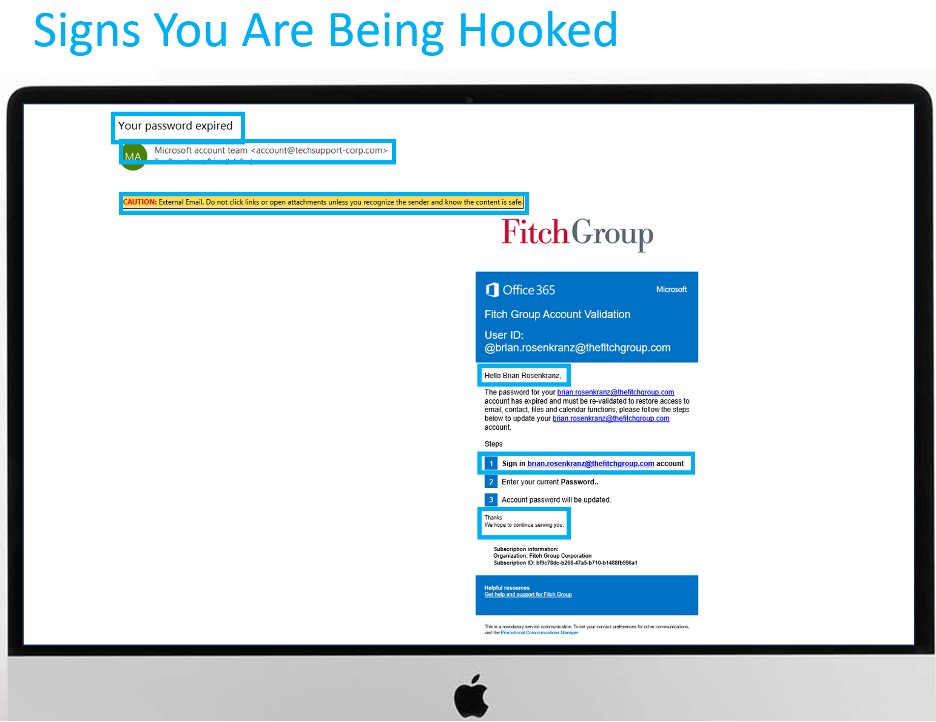
Be on the lookout for suspicious Jira ticket notifications or unexpected links, and never take action on tickets that seem unusual or come from unfamiliar sources.
Quick Stats
Ready to brush up on your phish detecting skills?
Phish Tank is your essential resource for exploring phishing examples from Fitch’s simulation program. These simulations, based on real attacks, enhance your ability to recognize and deflect phishing attempts, helping you better protect against cyber threats. Explore now.
Did you receive an email that looks suspicious?
If you spot a sketchy email in your inbox, use the phishing button in Outlook. It’s a quick and easy way to keep our digital space safe and sound. By flagging these suspicious messages, you’re playing a vital role in protecting our data and avoiding harm to the company.

You can report a suspected phishing email here, and we’ll investigate it right away. It’s a quick and easy way to keep our digital space safe and sound. By flagging suspicious messages, you’re playing a vital role in protecting our data and avoiding harm to the company.
Update Your Passwords Now
MAKE IT STOP! Robocalls are up 10% during the first half of this year, especially telemarketing calls generated by AI. We’re talking nearly 30 billion calls, in all! And if you’re getting more than your share, it could be because of what you’re doing on your social media feeds.
- If your phone number is visible on your social media profile, even just to “friends,” on your online bio, or a business post, it can be scraped and sold to spam call lists. Check LinkedIn, in particular.
- Oversharing personal details like your job, birthday, or recent purchases helps scammers craft targeted, believable calls.
- Accepting friend requests from strangers can expose your contact info to bad actors posing as real people.
- Engaging with quizzes, or “comment to win” posts can easily link your profile to scam databases.
Four steps to managing the flood of calls:
- Keep your number private. Don’t ever include it in what you post.
- Enable call-blocking features on your phone (such as “Silence Unknown Callers” on iPhone or call-blocking tools on Android).
- Consider subscribing to call-blocking apps like Hiya, Robokiller, or Truecaller or carrier-provided solutions (like AT&T ActiveArmor, Verizon Call Filter).
- And if you get an unidentified call, let it go to voice mail.


Your goal is to find all the words hidden in the puzzle — including one special word called the Master Knot.
- To make a word, connect letters that touch each other (up, down, sideways, or diagonally). You can either click and drag across the letters or tap them one by one. Tap the last letter again to submit the word.
- Some words will relate to cybersecurity — others won’t. But finding non-theme words fills up your Hint Meter, which will reveal a hidden theme word.
- The game ends when you find all the theme words, including the Master Knot. Every letter in the puzzle will be used — and sometimes, the Master Knot may cross over other words!
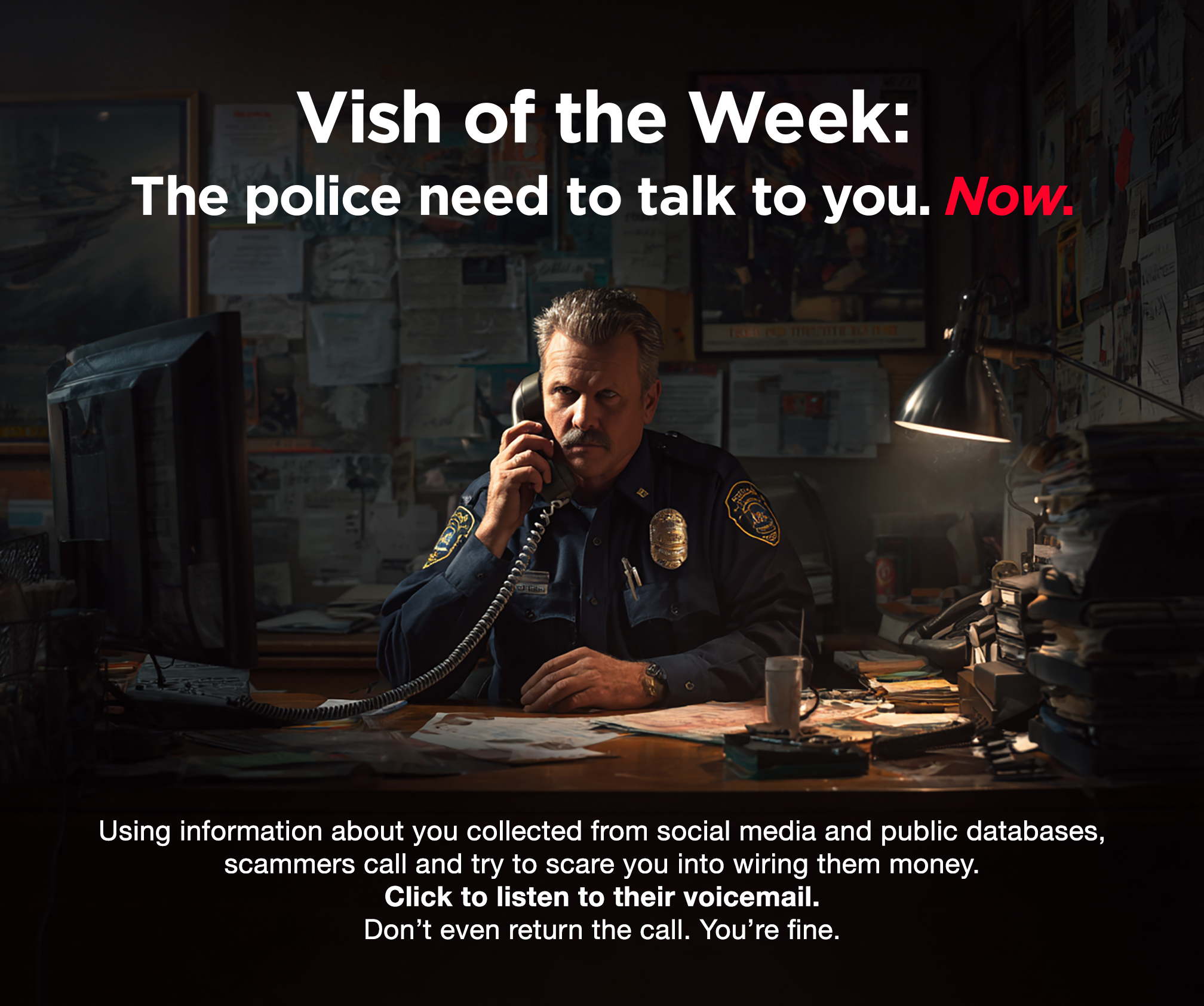
Click here to listen to the actual voicemail.
Update Your Passwords Now
These organizations say they have been hacked recently. If you do business with any of these companies, change your account password and use two-factor authentication wherever possible.

Want to learn more?
Visit us at the Information Security Team FX site for helpful resources
or contact us at information.securitygroup@
to share interesting articles or suggestions for future newsletter topics.

One more thing...
Show this video to your parents.
It’s made entirely using AI by YouTuber Travis Bible and shows beyond a doubt
how technology is blurring the line between what’s real and what’s computer-generated.
Created by Travis Bible at @thetravisbible | Used with permission.
Answers to Your
Cybersecurity Questions

“How can you prevent AI robocalls from recording your voice and then using it to access your bank information?”
Good question: scammers can use AI to clone voices using only a few seconds of audio. That means your voicemail, a quick phone call, or even a video on social media could be used to fool your bank or your loved ones.
Here are five ways to stay safe:
- Use your phone’s default greeting. Even a short “Hi, this is Sam…” can give scammers enough to mimic your voice! On your iPhone or Android phone, go to Settings > Voicemail > Choose default greeting.
- When an unknown number calls, let them talk first. Saying “Hello?” gives them more to work with.
- Think twice before posting videos that include your voice on social media, especially ones with your name or words like “yes” or “no.”
- Pick a code word only trusted contacts know. If someone calls in a panic, ask for it before you do anything.
- And finally, send unknown calls straight to voicemail. If it’s important, they’ll leave a message.

“I signed up for a data removal service but heard that it’s not a great investment. Are data removal services worth it?”
Data removal services say they’ll remove your personal information from people-search sites, but none can wipe you completely. The best ones remove around 60–70% of your data over a few months, while others barely hit 35%. New data broker sites pop up constantly, and your info can reappear even after being removed.
Consumer Reports says EasyOptOuts and Optery had the best success rates. Services like Confidently and ReputationDefender didn’t do as well. Plus, at $8 to $25 a month, they’re not cheap.
Ironically, doing it yourself, submitting opt-out requests manually, is probably faster and more effective, but involves a lot more work on your part. Just know: no service is “set it and forget it.”
“Would it be better to take the banking apps off my phone and just call the bank daily to check on my accounts?”
No, for most people, keeping the banking app with good security practices is safe and far more practical than relying on calling your bank every day.
But be smart. Use two-factor authentication to log into your bank account. (Most banks require that these days anyway.)
Set up instant alerts so you’re notified by text or email when there’s activity on your account.
And log out of your banking app when you’re done.
One more thing video courtesy of Travis Bible, on YouTube at https://www.youtube.com/channel/UCFqIZjhLR7b2DaBGVIAEQgQ | Original content © 2025 Aware Force LLC