
- Here’s a new clue for preventing Identity Theft. It starts with your mailbox.
- Hackers have started targeting vacation rentals. If you find one of these, destroy it.
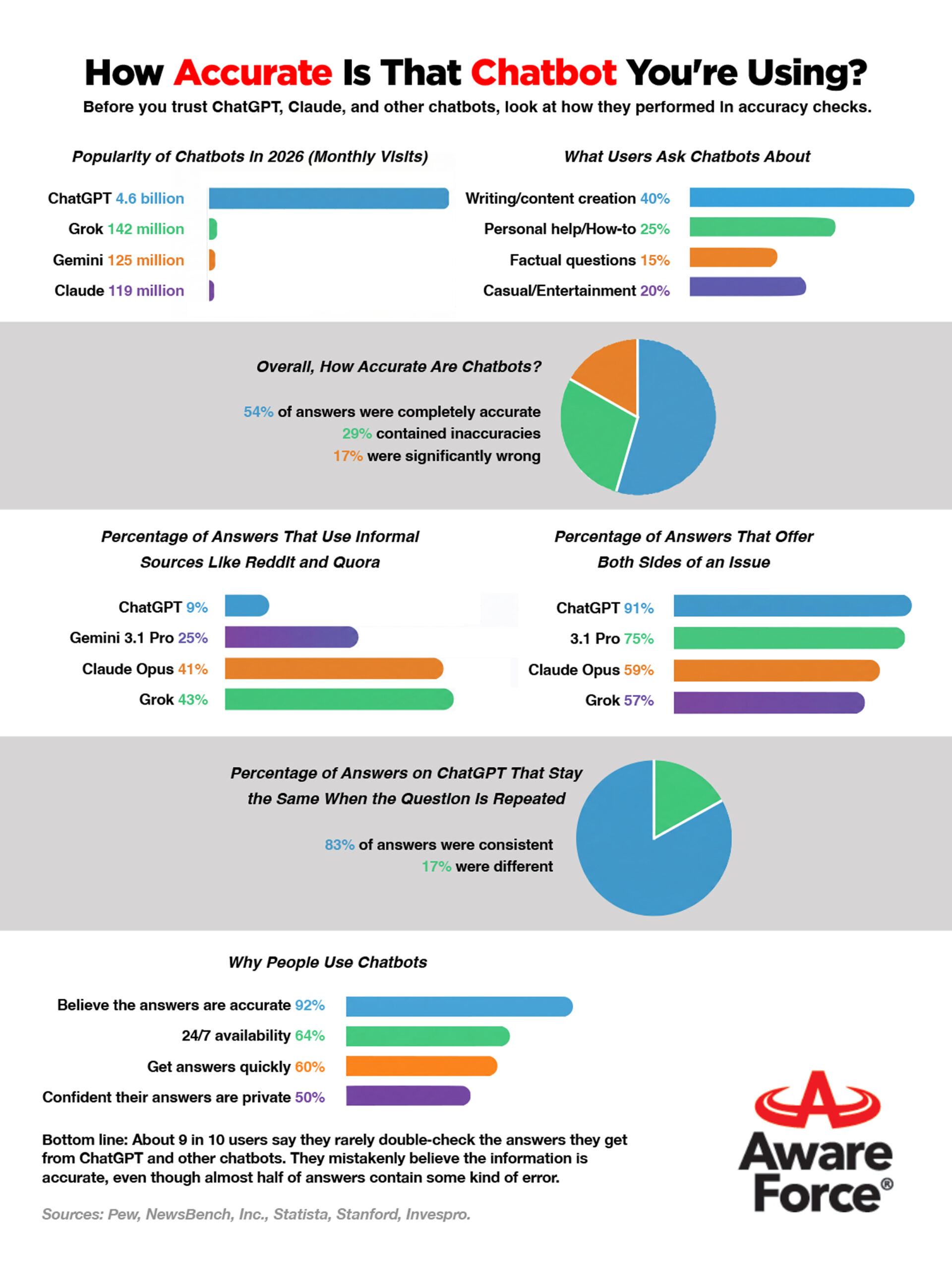
- How accurate are the answers you get from AI Chatbots? Let’s find out.
Was this content helpful?
Live Cyber Poll
Cybersecurity News You Can Use
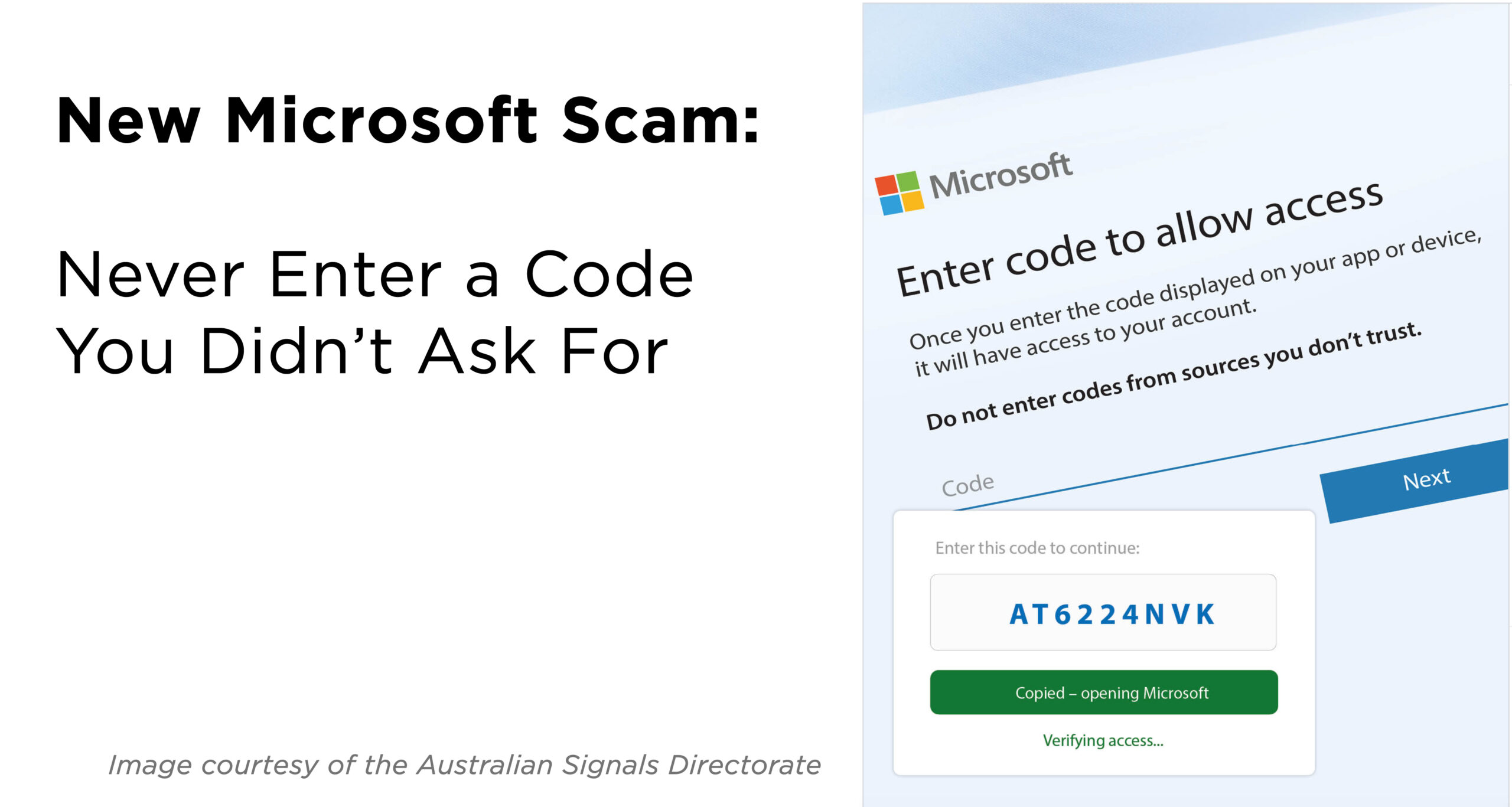
Scam alert (and this one is devious): an unexpected text or email arrives from Microsoft or your employer’s IT department instructing you to “enter this code,” “read a secure document,” “fix this security issue,” or “click here to verify.”
Here’s the trick: the message sends you to a legitimate Microsoft web page! (There’s a whole process behind the scenes that allows this to happen.)
If you enter that code number on the website, it allows the scammer’s computer to connect to your Microsoft or Teams account as if you had approved it. From that point on, scammers can read your email, open your files, or access work systems while everything looks normal to you.
Here’s how to avoid this problem: never click on a message asking you to enter a one‑time code if you didn’t start the login yourself.
Vacation Charging Trap:
The Danger of Left‑Behind Cables
While traveling on vacation, you get a nice surprise: somebody accidentally left a charging cable lying around.
Be aware! That cable can be a trap. Click below to watch how scammers’ cables hide tiny computers that steal your data…but you think you’re just recharging your phone.
Update Your Password

Users’ passwords from these organizations have recently been found for sale on the dark web.
If you do business with any of these companies, change your account password and use two-factor authentication wherever possible.
One more thing...
You recently had a video about “passkeys,” where the app requires your fingerprint or a scan of your eye to log on. But with that, how do heirs get into computers, phones, etc., when someone dies? My late husband had eye recognition to get into his laptop. It was a major headache for me to find his password to override the eye scan.
When dealing with tech and data, it is always crucial to plan, just like you would for a will.
The key for all of us is to set up available tools. Apple has a Legacy Contact feature for iPhones and Macs, Google offers its Inactive Account Manager, and password manager apps have emergency‑access features so a trusted person can request access with a code and a death certificate instead of guessing passwords or bypassing face/fingerprint unlocks.
Pick one or two trusted people now, document how they’ll get into your primary device or password manager, and store that instruction where your executor or family knows to find it.
I see where AI can now read your fingerprint from photos that are posted to social media. How is this possible?
Well, it is possible, but the claims are exaggerated. This only works when the image is high‑resolution, well-lit, and shows fingertips very close to the camera. So, avoid posting close‑up “peace sign” style selfies with sharp fingertip detail. But frankly, peoples’ fingerprints are not being harvested.
I downloaded an app from the App Store, and now I read the app is dangerous and should be deleted. How can that happen? Should I stop using the app store?
There is a small risk, yes: app stores are much safer than downloading random apps from the web, but they’re not perfect. Apple rejected over 2 million app submissions last year.
Still, researchers found dozens of malicious apps slipping through Apple’s App Store and Google Play and being downloaded tens of millions of times before being removed. The most common malicious apps allow unwanted ads to appear on your computer, steal logins or financial data, or impersonate brands.
Stick to well‑known publishers, check out reviews before downloading, and delete anything that asks for access it shouldn’t need.
Send us your cybersecurity question
for possible use in a future newsletter.
You don’t have to provide your name or email address.
If you do include an email address, we’ll do our best to respond to your question.
Was this content helpful?
Cyber Content Archive: Always Available

Cyber cartoon © 2026 CartoonStock | Original content © 2026 Aware Force LLC